Agent Harnessing: Building the Application Layer Around AI Agents
A technical guide to agent harnessing: how the application layer gives AI agents state, tools, memory, validation, observability, and RL-ready traces.
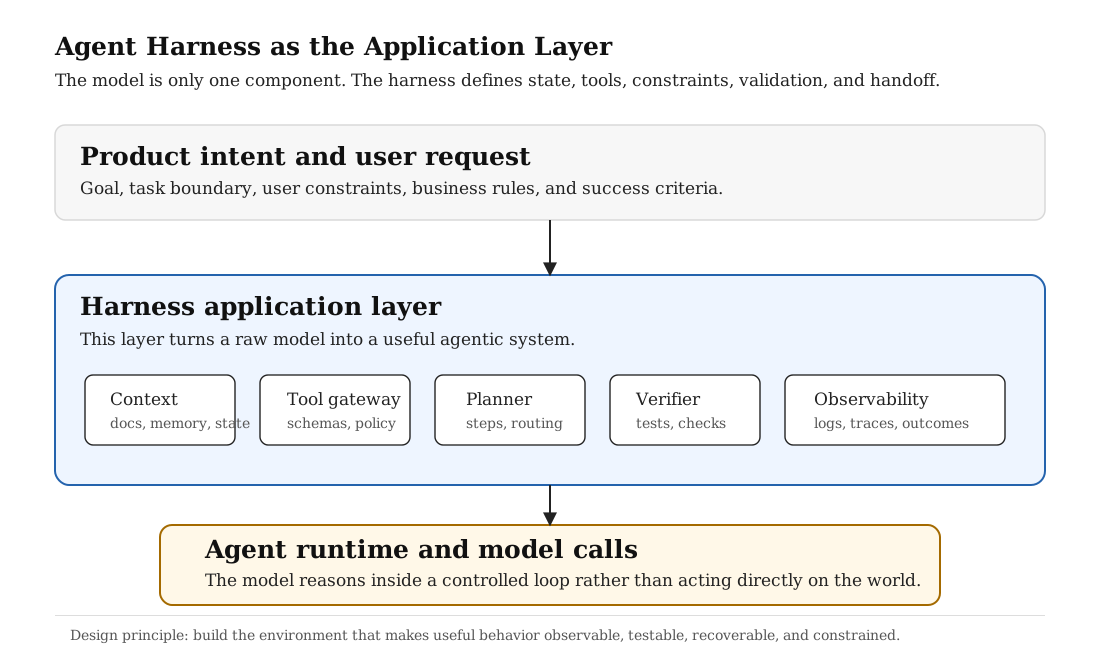
A useful agent is not just a model with a long prompt. It is a model operating inside an application layer that gives it tools, state, memory, constraints, validation, observability, and a way to recover when work spans many steps. The harness is where an AI system stops being a demo and starts becoming software.
What Is Agent Harnessing?
Agent harnessing is the practice of building the application layer around an AI agent so that the agent can do useful work in a controlled, observable, and recoverable way. The harness is not the model itself. It is the surrounding system that tells the model what it can see, what it can do, how tool use works, how progress is stored, how success is checked, and when a human should be brought back into the loop.
This matters because agent quality is not determined only by model capability. A strong model inside a weak harness will still lose context, call the wrong tool, skip validation, repeat stale assumptions, or confidently declare success before the task is actually complete. A smaller model inside a strong harness can sometimes behave more reliably because the environment makes the correct behavior easier and the incorrect behavior harder.
I think of an agent harness as a runtime for applied reasoning. It turns an open-ended instruction like "fix this bug", "review this contract", or "process this support request" into a structured loop: gather state, choose a workflow, call tools through a gateway, validate the result, persist progress, and expose enough evidence for review.
The reason this deserves its own term is that an agent harness is not just orchestration glue. It decides what the agent is allowed to know, how it is allowed to act, how it receives feedback, and how its work becomes durable. In normal application development, we think carefully about the user interface, database schema, authorization layer, background jobs, and observability stack. Agent applications need the same seriousness around the model's operating environment.
A chat model can answer a question from its context window. An agent has to do more: inspect the world, choose between possible actions, update external state, notice when an action failed, and continue without losing the thread. That is why the harness is best understood as the application layer around the agent, not as a prompt template.
| Layer | Main question | Example responsibility |
|---|---|---|
| Model | What should I reason about next? | Generate a plan, choose a tool, draft an answer, revise after feedback. |
| Harness | What can the agent see and do? | Provide context, tools, policies, memory, validation, and traces. |
| Application | What is the real product workflow? | Legal review, ticket resolution, data analysis, customer account update. |
Why Prompting Is Not Enough
Prompting tells the model what you want. A harness gives the model a world it can operate in. That distinction is the whole point.
For a short one-turn task, a prompt may be enough. But once an agent has to work across files, documents, browser state, API calls, user preferences, logs, tests, memory, or multiple sessions, the prompt becomes only one part of the system. The agent needs an environment that preserves facts outside the context window and gives the model feedback about whether its actions worked.
I frame this as two connected problems. First, agents need continuity: durable artifacts such as progress logs, feature lists, setup scripts, and clean handoff state. Second, agents need a legible application environment: they need tools to inspect runtime behavior, structured state they can trust, and repeated lessons encoded as mechanical checks instead of relying on memory or vibes.
The shared lesson is simple: if the agent cannot inspect the state, it will infer. If it cannot validate the result, it will guess. If it cannot persist progress, the next run starts from fog. The harness exists to remove as much of that fog as possible.
This is also where many agent projects go wrong. They begin by asking "how do I make the model smarter?" when the more useful question is often "what is the model missing from its environment?" Maybe it needs a real browser, not a screenshot. Maybe it needs a structured task ledger, not a summary in chat. Maybe it needs a safe tool gateway, not direct database access. Maybe it needs a verifier that can reject shallow work, not another paragraph in the system prompt.
Prompting is still important. The model needs role, task, style, and policy instructions. But prompting does not create durable memory. It does not create a database transaction boundary. It does not guarantee a browser flow actually works. It does not decide whether a refund tool is safe to call. Those are harness responsibilities.
Definition: an agent harness is the structured application layer that gives an agent state, tools, policies, memory, validation, observability, and handoff protocols.
What the Two Source Posts Add
The two engineering posts that motivated these notes are useful because they attack the same problem from different levels. One is mostly about how an agent keeps working across long-running sessions. The other is about how an engineering organization changes when agents become part of the development loop. I do not want to copy their vendor-specific framing. The deeper point is more general: agents need legible environments.
The long-running-agent view is practical and almost operational. It asks: when the context window is gone, what does the next run know? What counts as done? What should the agent do first when it wakes up? What should it leave behind before stopping? This leads to artifacts like progress logs, feature lists, setup scripts, git history, and end-to-end checks.
The harness-engineering view is broader. It asks: how should an application be built so an agent can inspect it, modify it, test it, and learn from failures? This leads to structured documentation, local observability, mechanical rules, shorter feedback cycles, task plans stored in the repository, and automated cleanup of drift.
| Problem | Harness answer | Application-layer version |
|---|---|---|
| The agent forgets what happened before. | Externalize memory into artifacts. | Store task state, decisions, traces, and unresolved work in durable storage. |
| The agent marks work done too early. | Define acceptance criteria outside the prompt. | Use feature checklists, workflow tests, and verifier gates. |
| The agent cannot see runtime behavior. | Make the application legible. | Expose logs, screenshots, DOM snapshots, database fixtures, and metrics. |
| The agent repeats bad patterns. | Encode constraints mechanically. | Add linters, policy gates, schema checks, and regression tests. |
The Agent Harness Control Loop
A good harness is not a single request-response wrapper. It is a loop. The agent observes state, makes a plan, acts through tools, validates the result, persists what changed, and uses failures to improve the future environment.
This is why harness engineering feels close to reinforcement learning environment design. The agent does not just emit text. It interacts with a stateful environment. The environment defines the observation space, the action space, the transition function, and the reward signals. In software and product work, those reward signals are tests, user-visible behavior, logs, evals, human review, and production telemetry rather than a single scalar reward.
The control loop is the place where a harness becomes more than a wrapper. A wrapper takes a user request, sends it to a model, and returns the model's answer. A harness asks what state is relevant, what action is safe, what result should be expected, what evidence was produced, and what should happen if the result is not good enough.
That last part is important. A strong harness does not treat failure as a surprise. It expects failures and gives them structure. A tool can fail because its arguments were invalid, because the user lacks permission, because the resource does not exist, because the external API timed out, or because the observation contradicts the agent's plan. Those are different failures. A harness should represent them differently so the agent can recover differently.
| RL term | Agent harness equivalent | Example |
|---|---|---|
| State | Current task context | User request, active document, logs, tool history, memory. |
| Action | Tool call or final response | Search document, inspect account, run browser test, ask for approval. |
| Transition | Application state update | New observation, changed ticket, added note, failed test output. |
| Reward | Validation signal | Tests pass, verifier accepts, user goal completed, no policy violation. |
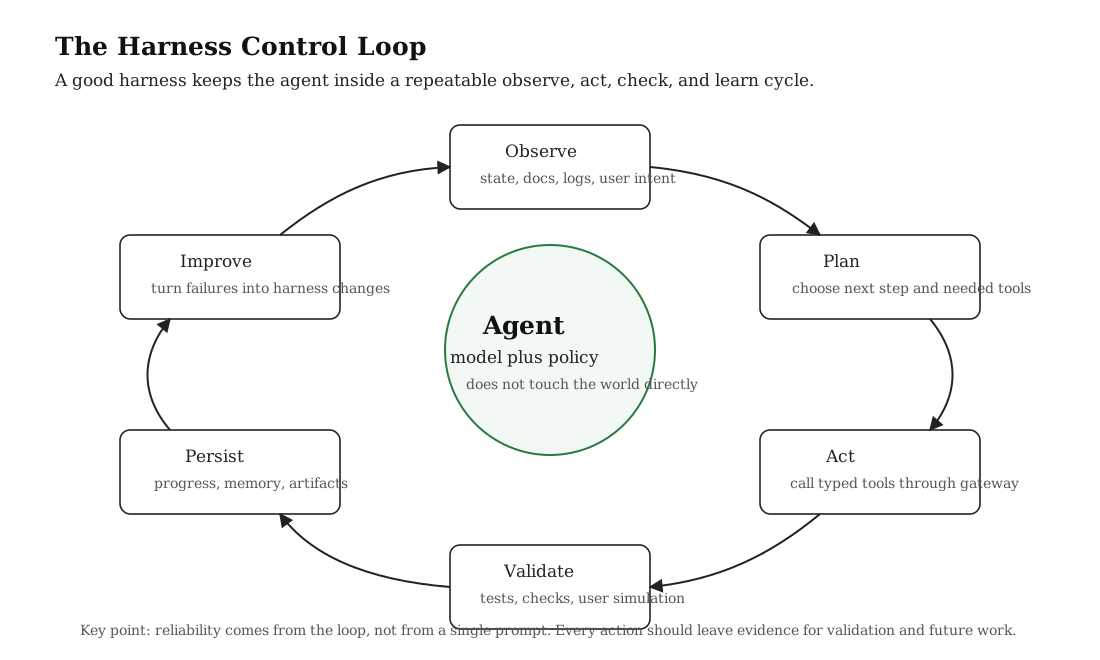
The practical result is that the harness reduces the number of things the model has to hold in fragile natural-language memory. The current task is represented in a task object. The available actions are represented in a tool registry. The last outcome is represented in logs. The acceptance criteria live in a test or checklist. The model still reasons, but the environment carries more of the burden.
A useful design question is: what should be inside the model's context, and what should live outside it? The answer should almost never be "everything goes into the context." The context should contain the relevant slice. The rest should live as retrievable state, durable artifacts, and tools that can be invoked when needed.
Key Principles of a Good Agent Harness
A good agent harness should make useful work easier than chaotic work. These are the principles I would start from when designing one.
These principles are intentionally boring. That is a feature, not a weakness. Reliable agent systems are usually built from ordinary software engineering ideas applied very deliberately: typed boundaries, logging, testability, recovery, permissions, and state management. The novelty is that the "user" of many internal interfaces is now a model.
Externalize state
Do not ask the model to remember the project. Store state in files, databases, memory stores, traces, plans, feature lists, and progress logs.
Make the application legible
Expose logs, screenshots, DOM state, database fixtures, tool traces, and metrics so the agent can observe behavior instead of guessing.
Use typed tools
Every tool should have a schema, permission level, result shape, error format, and audit trail. Tool calls are actions, not casual text.
Validate end to end
Unit tests are useful, but agents also need user-level checks: browser flows, document reviews, task completion, and realistic workflows.
Persist handoff evidence
Long-running work needs clean handoff artifacts: what changed, what passed, what failed, what remains, and how the next run should start.
Encode constraints mechanically
Architecture rules, permissions, lint checks, safety gates, and evals should enforce invariants instead of living only in instructions.
The last point is probably the most underrated. Agents are good at following local patterns. That means they will also copy bad local patterns. If your codebase, workflow, or application has no mechanical boundary, the agent will slowly normalize whatever it sees. A harness should make the preferred path obvious and the dangerous path difficult.
In practical terms, this means the harness should come with a product-specific constitution. Not a giant system prompt, but a set of executable rules: what tools require approval, what outputs need citations, what states are allowed to transition, what tests must pass, what files can be edited, what data can leave the boundary, and what must be escalated to a human.
Continuity Artifacts for Long-Running Agents
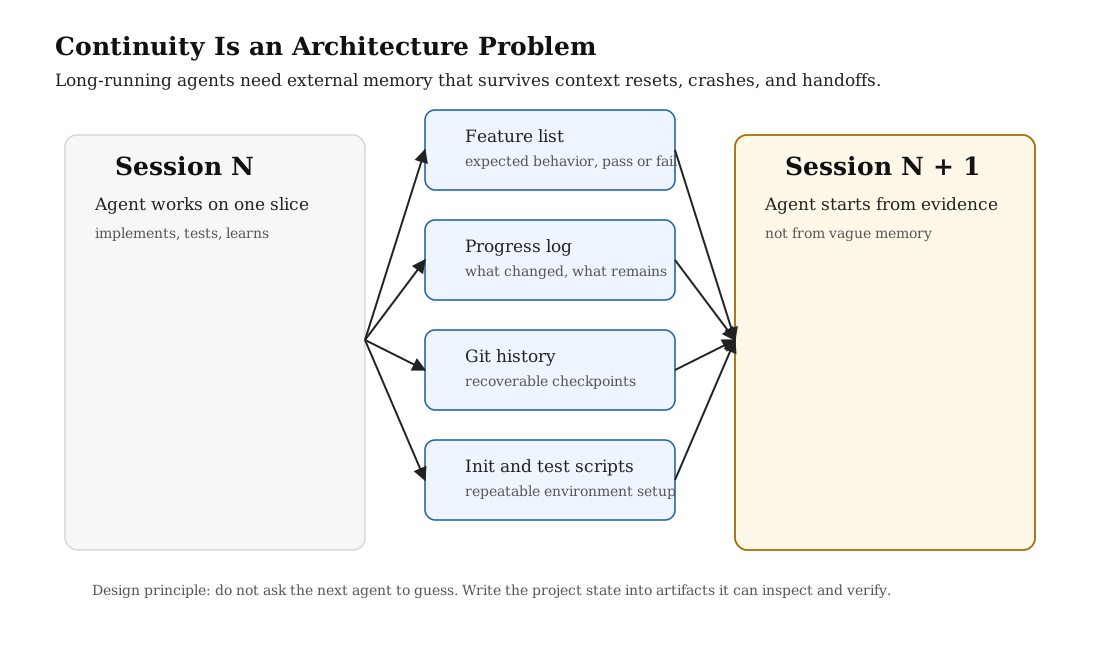
The hardest agent tasks are not always the hardest reasoning tasks. Often they are the longest tasks. The agent has to work, stop, resume, and still know where it is. That requires continuity artifacts.
The key pattern from the long-running-agent view is that each session should leave the next session in a better state. A future agent should not need to reconstruct the entire project from a transcript. It should be able to read the current feature list, progress notes, git history, failing tests, and setup instructions, then choose one next unit of work.
This is where the initialization-versus-continuation pattern is especially useful. The first run should create the scaffolding that future runs depend on. It should not only start the app. It should write the setup script, define the feature list, create the progress file, and make the first clean checkpoint. After that, continuation runs should behave more like disciplined workers: read the state, choose one unfinished feature, test it, commit or persist the outcome, and update the handoff artifacts.
This matters outside coding too. A legal agent can persist the uploaded document, the current matter, the jurisdiction, reviewed clauses, unresolved risks, and user preferences. A customer-support agent can persist account context, the active ticket, tool calls already made, and policy references. A research agent can persist hypotheses, rejected experiments, scripts, and result tables.
The principle is general: the harness should decide what must survive the context window.
A continuity artifact should be precise enough that the next run can take action. "Made progress on the UI" is not useful. "Checkout flow opens, payment form renders, address validation fails for empty apartment field, next step is to fix `validateAddress` and rerun browser test `checkout_empty_apt`" is useful. The goal is not writing a diary. The goal is compressing the operational state of the work.
A Minimal Continuity Contract
{
  "task_id": "contract_review_042",
  "current_goal": "Review indemnity and liability clauses",
  "completed": [
    "uploaded document indexed",
    "jurisdiction identified as California",
    "liability cap clause retrieved"
  ],
  "open_questions": [
    "whether limitation of liability conflicts with indemnity scope",
    "whether consequential damages exclusion is mutual"
  ],
  "last_validated_step": "retrieval returned sections 8.1, 8.2, and 12.4",
  "next_action": "run clause-risk workflow on retrieved sections",
  "handoff_notes": "Do not answer from general law until document clauses are cited."
}
This kind of object is more valuable than a loose chat summary because it separates completed work, open uncertainty, validation, and the next recommended action. The next agent can inspect it, challenge it, or continue from it.
Tool Use Is the Action Space
Tool use is where agent harnessing becomes real application engineering. Once an agent can call tools, it can affect the outside world. It can read documents, query a database, browse an interface, update a ticket, write a file, call an API, trigger a workflow, or send a message. That means tool use needs more structure than "the model asked for a function".
In a mature harness, tools should sit behind a gateway. The gateway validates arguments, checks permissions, controls whether the action is read-only or state-changing, normalizes results, records an audit trail, and returns errors in a form the agent can reason about.
This is one of the biggest differences between a toy agent and an application-layer agent. In a toy agent, tools are convenience functions. In a real harness, tools are governed interfaces. They are the action space of the system. If the tools are vague, unsafe, or inconsistent, the agent's behavior becomes vague, unsafe, and inconsistent too.
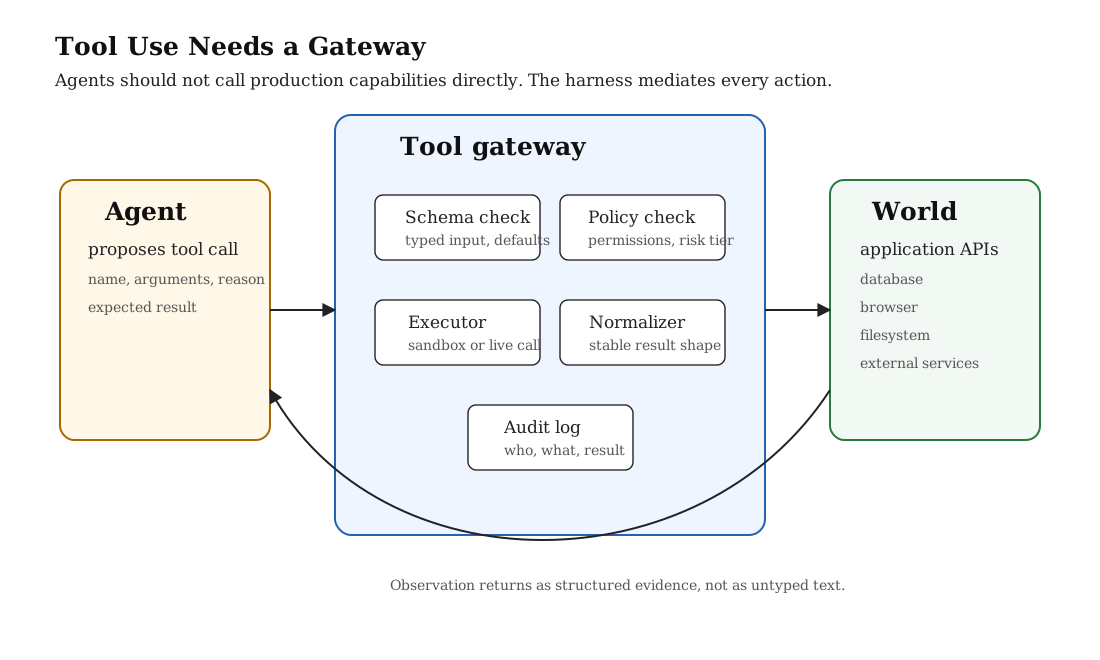
The gateway should also separate read tools from write tools. Read tools gather evidence. Write tools change state. A good harness may allow the agent to freely call low-risk read tools, require confirmation for high-risk write tools, and block destructive tools unless a policy condition is satisfied.
This is where many weak agents fail. They have tools, but the tools are too raw. The agent sees ambiguous errors, receives inconsistent output formats, or gets permission to do too much too early. The result is not real autonomy. It is unstructured automation.
I like to divide tools into four classes. Observation tools gather state. Analysis tools transform state into a useful intermediate artifact. Proposal tools draft an action without committing it. Commit tools change the world. Most agent applications become safer when these classes are explicit. The agent can observe and analyze freely, propose with explanation, and commit only when policy allows it.
| Tool class | Purpose | Example | Default policy |
|---|---|---|---|
| Observation | Read the environment. | Retrieve document chunk, inspect ticket, open browser page. | Usually allowed, but logged. |
| Analysis | Create intermediate reasoning artifacts. | Classify clause risk, cluster failures, compare traces. | Allowed if inputs are authorized. |
| Proposal | Prepare an action without applying it. | Draft refund, draft contract redline, draft database migration. | Allowed, requires user-visible explanation. |
| Commit | Change external state. | Issue refund, send email, merge change, update record. | Approval gated or verifier gated. |
What a Good Tool Contract Includes
| Contract element | Why it matters |
|---|---|
| Typed schema | Prevents vague or malformed actions. |
| Permission tier | Separates safe reads from risky writes. |
| Idempotency rule | Lets the harness retry safely when a call fails. |
| Stable result shape | Lets the agent compare results across calls. |
| Error taxonomy | Turns failures into recoverable information. |
| Audit record | Makes actions reviewable by humans and future agents. |
Tool output is just as important as tool input. If one tool returns free text, another returns partial JSON, and a third returns a stack trace, the model has to normalize the environment itself. That is wasted reasoning. A harness should normalize outputs into a stable shape with status, data, warnings, and recoverable error categories.
{
  "tool_name": "retrieve_document_chunks",
  "permission": "read",
  "input_schema": {
    "document_id": "string",
    "query": "string",
    "top_k": "integer"
  },
  "result_schema": {
    "status": "ok | no_match | permission_denied | error",
    "chunks": "array",
    "citations": "array",
    "warnings": "array"
  },
  "audit": {
    "record_input": true,
    "record_output_hash": true,
    "requires_human_approval": false
  }
}
Reference Architecture
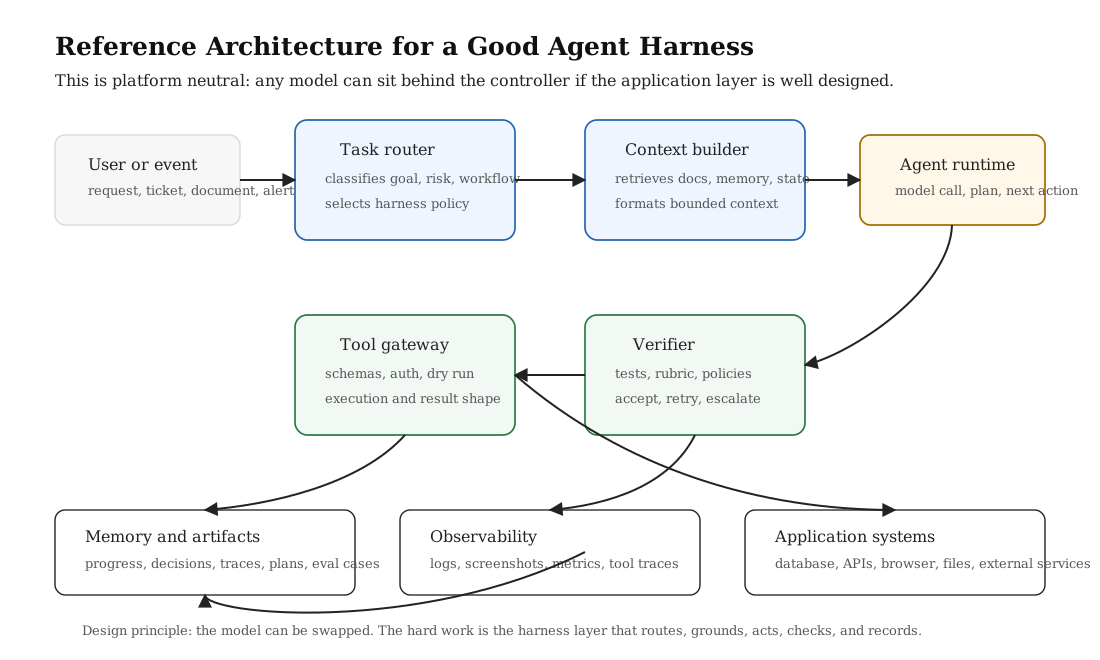
A general-purpose agent harness can be designed as a set of application services around the model. The model can be swapped. The harness is the part that routes tasks, builds context, exposes tools, checks output, stores memory, and surfaces evidence.
I would separate the architecture into six planes: task routing, context construction, agent runtime, tool mediation, verification, and memory or observability. Each plane should be owned by application code rather than hidden inside a monolithic prompt. This keeps the system debuggable.
The Main Components
Task router. The router classifies what kind of job this is. Is it a document review, a support ticket, a code change, a data analysis request, or a workflow action? It also estimates risk. A low-risk explanation task and a high-risk account update should not use the same policy.
Context builder. The context builder decides what the model should see. It retrieves documents, memory, logs, database rows, policy snippets, and prior decisions. The goal is not to stuff everything into context. The goal is to construct the smallest context that is sufficient for the current step.
Agent runtime. This is where model calls happen. The runtime may ask the model to plan, choose a tool, summarize evidence, generate a candidate answer, or revise after validation. It should not be allowed to bypass the harness.
Tool gateway. This mediates all action. Tools should be typed, permissioned, logged, and normalized. For risky tools, the gateway can require human confirmation or a separate verifier.
Verifier. The verifier checks whether the work satisfies the task. Depending on the domain, this may be tests, browser automation, a rubric, a policy check, a consistency check, a quote-grounding check, or human review.
Memory and artifacts. The memory layer stores what should survive. This may include user preferences, active matter state, unresolved tasks, experiment results, known failures, generated plans, or tool traces.
Observability. A good harness produces traces. You should be able to answer: what did the agent see, what did it decide, what tool did it call, what came back, what check passed, what failed, and what changed?
Notice what is missing from this architecture: there is no assumption that the agent is one specific product. The model runtime could be any strong language model. The harness is the durable part. It is where the product workflow, risk model, data access rules, evaluation logic, and memory format live.
Three Example Harnesses
| Application | State | Tools | Verifier |
|---|---|---|---|
| Legal document assistant | Document, jurisdiction, matter history, user risk tolerance. | Clause retrieval, citation extraction, risk rubric, redline draft. | Grounding check, missing-clause check, legal disclaimer policy. |
| Customer-support agent | User account, active ticket, policy docs, prior tool calls. | Inspect order, retrieve policy, draft refund, update ticket. | Authentication check, policy compliance, write-action confirmation. |
| Research agent | Hypotheses, datasets, scripts, experiment logs, result tables. | Run experiment, plot results, inspect failures, write report. | Reproducibility check, heldout eval, regression comparison. |
Evaluation Is the Reward Signal
If the harness is the environment, evaluation is the reward signal. But in real applications, the reward should rarely be one number. A useful agent needs layered feedback.
Fast checks catch cheap mistakes: syntax, types, formatting, schema compliance. Integration checks catch tool and data problems. User-level checks catch whether the workflow actually functions. Outcome checks catch whether the result was useful, safe, and non-regressive.
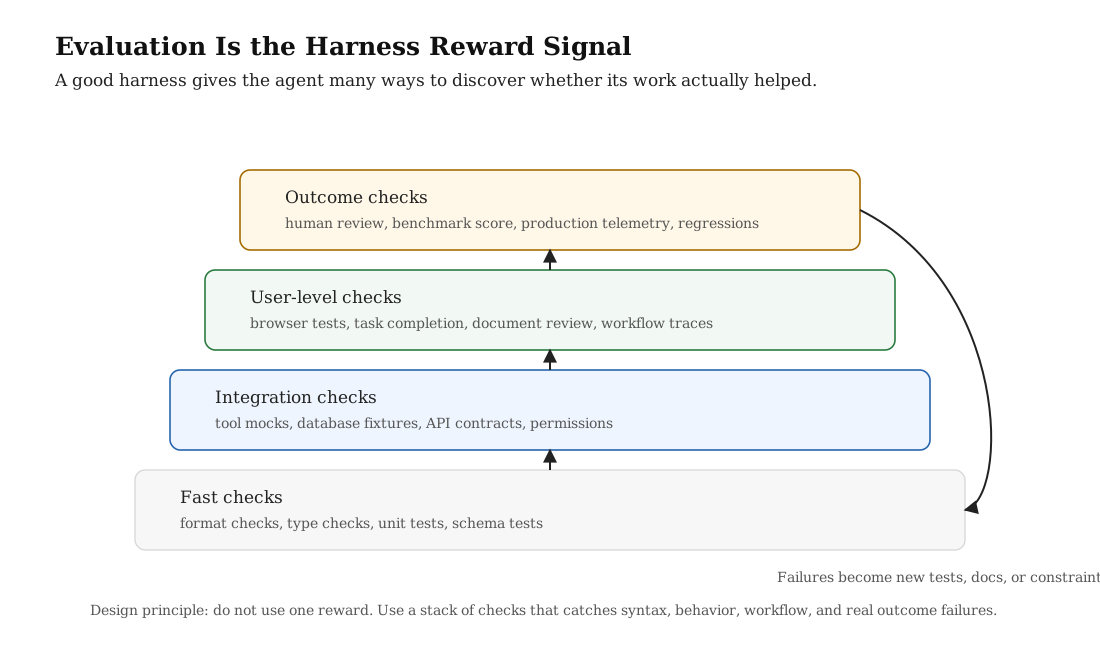
This is why an agent harness should not only run tests after the agent finishes. It should use evaluation throughout the loop. Before acting, it can check whether the context is sufficient. After tool use, it can check whether the observation answered the question. Before final output, it can check grounding, policy, formatting, and user-facing quality. After deployment, it can use real failures to expand the regression suite.
The most important evaluation habit is turning failures into harness changes. If the agent repeatedly answers without citing the uploaded document, do not only tell it "please cite the document." Add a grounding verifier that rejects uncited claims. If the agent repeatedly calls a write tool too early, do not only add a warning to the prompt. Add a permission gate that requires the right preconditions before the tool can execute.
This is where harness engineering becomes a compounding process. Every serious failure should leave behind an artifact: a new test, a new verifier rule, a new tool constraint, a clearer state field, or a better handoff note. The system should get harder to fool over time.
failure observed
  -> classify the failure
  -> decide whether it is a model issue or harness issue
  -> add a general check or constraint
  -> rerun the task and nearby tasks
  -> keep the change only if it reduces failures without blocking valid work
When the Harness Becomes the RL Environment
The next step is the one I find most interesting: once a harness defines state, actions, tools, traces, and evaluation, it starts to look like an RL environment. This does not mean every application harness should immediately become a training system. It means the same design choices that make an agent useful at test time also make it possible to collect better training data later.
The Polar paper makes this point very directly. It argues that agentic RL increasingly depends on custom harnesses: coding harnesses, browser harnesses, operating-system harnesses, multi-agent harnesses, and long-running tool-use systems. These harnesses are not simple Gym environments. They are complex software products with their own context management, tool formats, runtime setup, evaluation logic, and action protocols.
The key idea in Polar is to avoid rewriting the harness into an RL framework. Instead, keep the native harness running as-is and observe it at the model API boundary. Every LLM agent eventually calls a model endpoint. If a proxy sits at that boundary, it can record prompts, sampled tokens, log probabilities, tool definitions, responses, and metadata while returning the same provider-shaped response the harness expects.
This changes how I think about application-layer harnesses. A good harness is not only a deployment wrapper. It can become the place where rollouts are generated, rewards are assigned, failures are logged, and future post-training data is collected.
native application harness
  -> model API proxy
  -> token-level capture
  -> trajectory reconstruction
  -> evaluator reward
  -> RL or SFT trainer
  -> updated model
  -> same native harness
Why This Is Relevant to Application-Layer Harnesses
If you build a legal assistant, a support agent, or a research agent, your harness already contains the real environment. It knows how documents are retrieved, how tools are called, how state changes, and what a successful task looks like. Throwing that away and building a separate toy RL environment can lose the very behavior you care about.
The better direction is to make the production-style harness observable enough that it can also support training. The application harness remains product-native, but it emits the artifacts needed for learning: traces, tool calls, verifier outputs, rewards, and provenance.
| Application harness concept | RL environment equivalent | What to record |
|---|---|---|
| Task state | Observation | Prompt, retrieved context, memory, tool history, environment metadata. |
| Tool gateway | Action space | Tool name, arguments, permission tier, result, error category. |
| Application transition | State transition | New document state, ticket update, patch, browser state, database change. |
| Verifier | Reward function | Pass/fail, rubric score, test result, policy violation, human approval. |
| Trace store | Replay buffer or training corpus | Token IDs, logprobs, messages, loss masks, rewards, provenance. |
How to Do Harness-Based RL Well
First, keep the harness native. The agent should train on the same action protocol it will use at evaluation or deployment time. If the model must learn a specific tool schema, patch-submission style, browser workflow, document-retrieval format, or memory policy, then the rollout should happen inside that real harness rather than a simplified imitation.
Second, instrument the boundaries. At minimum, capture model calls, tool calls, verifier outputs, task IDs, session IDs, policy version, and runtime metadata. The model-call boundary matters because RL updates need to know which tokens were actually sampled by the behavior policy. A plain transcript is not enough.
Third, preserve token fidelity. Polar emphasizes this because decoding and re-tokenizing a conversation can produce token IDs that do not match the original generation. For RL, that is not a small formatting bug. The gradient is attached to tokens. A training trace should know which tokens came from the sampled assistant response, which tokens were prompt/context tokens, and which tokens should be masked out.
{
  "session_id": "legal-agent-rollout-018",
  "task_id": "contract-risk-review-042",
  "prompt_ids": ["..."],
  "response_ids": ["..."],
  "loss_mask": [1, 1, 1, 0, 0],
  "response_logprobs": ["..."],
  "tool_calls": [
    {
      "name": "retrieve_clause",
      "arguments": {"clause_type": "indemnity"},
      "status": "ok"
    }
  ],
  "reward": 1.0,
  "reward_source": "grounded_clause_risk_verifier",
  "metadata": {
    "harness": "legal_review_harness",
    "policy_version": "v7",
    "builder": "prefix_merging"
  }
}
Fourth, separate rollout from training. Long agent runs are slow and uneven. Some tasks finish quickly. Others spend time installing dependencies, opening browsers, running tests, or waiting on tools. A scalable design treats rollout as a service: submit tasks, execute sessions asynchronously, reconstruct trajectories after the run, evaluate them, and let the trainer consume completed batches.
Fifth, be careful with credit assignment. A whole-session reward is easy to compute. For example, did the final patch pass tests? Did the contract answer cite the right clauses? Did the support workflow resolve the ticket without policy violation? But assigning that reward to every tiny model call can be noisy. Polar reports that naive request-level outcome reward broadcasting can create reward-hacking behavior. The lesson is that harness-level rewards are powerful, but they need grouping, normalization, process rewards, or careful trajectory construction.
Sixth, separate training evidence from evaluation evidence. If the harness learns from every failure in the evaluation set, the score stops meaning what you think it means. The clean setup is: training rollouts generate improvement data, development rollouts shape the harness and reward function, and held-out evaluation rollouts measure whether the agent actually generalized.
What Polar Shows
Polar trained the same Qwen3.5-4B base model with GRPO through several coding harnesses and reported improvements on SWE-Bench Verified. The biggest jump was under an unfamiliar harness protocol, where the base model scored 3.8% and the Polar-trained model reached 26.4%. Other harnesses improved more modestly, such as 29.8% to 34.6%, 34.6% to 35.2%, and 34.2% to 40.4%.
The exact numbers are less important than the systems lesson: the model was optimized on the behavior it actually needed to perform inside the harness. It was not trained on a generic chat transcript and then expected to magically adapt to a tool protocol at test time. The harness was the environment.
Polar also shows why trajectory construction matters. A per-request strategy keeps each model completion separate, which is conservative but can fragment a long session into many tiny traces. A prefix-merging strategy reconstructs longer append-only chains when the token prefixes prove that the conversation continued naturally, while separating compaction, subagents, and independent branches. That kind of detail matters if you want the training signal to match the actual agent behavior.
The Practical Takeaway
Even if you are not training a model today, design the harness as if you may want to learn from it later. Give every task a session ID. Log model calls. Log tool calls. Store verifier outputs. Keep clear train/dev/eval splits. Preserve enough provenance to know which model, prompt, tools, memory, and runtime produced the outcome.
This is why harnessing belongs in the application layer. The application layer knows the real task. It knows the real tools. It knows what success means. If that layer is designed well, it becomes both the runtime for the agent and the data engine for improving the agent.
How to Build a Good Agent Harness
A good harness starts from a narrow domain. Do not begin with "an agent that can do everything." Begin with a workflow that has real tasks, observable state, available tools, and measurable success.
Start with the task boundary
Define what the agent is responsible for and what it is not responsible for. A legal document assistant may explain clauses and flag risks, but not provide final legal advice. A support agent may draft actions, but require confirmation before refunds or account changes. A coding agent may modify a branch, but not deploy to production without review.
The task boundary should be written like an operational contract. It should include allowed tasks, forbidden tasks, escalation triggers, and success criteria. Without this contract, the model has to infer the boundary from tone. That is how systems drift from "summarize this contract" to "decide whether the user should sign it" without anyone noticing.
Define the state model
Decide what the agent needs to observe. This may include user message, active document, user account, current ticket, environment status, prior memories, open tasks, and relevant policies. Represent this state explicitly. The state object is the agent's map.
A weak harness throws all available context into the model and hopes the model sorts it out. A stronger harness separates state into typed fields. Some fields are user-visible. Some are internal. Some are retrieved. Some are trusted. Some are untrusted. That distinction matters because the agent should not treat a user-uploaded contract, a system policy, and a retrieved memory with the same authority.
{
  "task": {
    "id": "support_1182",
    "type": "refund_request",
    "risk": "medium",
    "status": "in_progress"
  },
  "authority": {
    "system_policy": ["refund_policy_v3"],
    "user_provided": ["message_1", "receipt_upload"],
    "retrieved_memory": ["previous_shipping_issue"]
  },
  "observations": {
    "account_verified": true,
    "order_status": "delivered",
    "refund_window_days_remaining": 4
  },
  "open_questions": [
    "whether item condition qualifies for immediate refund"
  ]
}
Design the tool registry
List the tools the agent can use. For each tool, define schema, permissions, execution mode, output shape, failure modes, and audit fields. Make the tool registry part of the application, not a pile of ad hoc functions.
The tool registry should be boring enough that a reviewer can inspect it. For each tool, ask: is it read-only or state-changing? Can it be retried? Does it expose private data? Does it require user confirmation? What is the maximum blast radius? What should the agent do if it fails? These are product questions as much as engineering questions.
Add verification before autonomy
The more autonomy you give the agent, the stronger verification must be. A harness that cannot detect failure should not grant high-impact actions. Start read-only, then add low-risk writes, then add approval-gated writes, then consider higher autonomy only after the eval stack is stable.
In practice, this creates an autonomy ladder. At the bottom, the agent only drafts. Then it can retrieve. Then it can propose structured actions. Then it can execute low-risk actions with checks. Only later should it execute high-impact actions. Each level needs a stronger verifier than the level before it.
Persist progress and failures
Every meaningful run should leave artifacts. Store what the agent attempted, what tools it called, what checks passed, what failed, and what should happen next. These artifacts are not just logs. They are the memory of the system.
This is especially important for long-running tasks. The agent should not only report the final answer. It should leave a trace of the path: retrieved sources, rejected options, verifier outputs, human approvals, and remaining uncertainties. That trace is what makes the system debuggable after the fact.
def run_agent_task(task):
    state = load_state(task)
    policy = route_task(task, state)
    context = build_context(task, state, policy)

    while not budget_exhausted(task):
        decision = agent_runtime.plan(context, policy)

        if decision.type == "final_answer":
            verdict = verify_answer(decision.output, state, policy)
            if verdict.passed:
                persist_result(task, decision.output, verdict)
                return decision.output
            context = add_feedback(context, verdict)
            continue

        tool_call = tool_gateway.validate(decision.tool_call, policy)
        observation = tool_gateway.execute(tool_call)
        record_trace(task, decision, observation)
        context = update_context(context, observation)

    escalate_to_human(task, context)
This pseudocode is intentionally plain. The important part is not the model provider. The important part is the structure: route, ground, act through a gateway, validate, record, and escalate when the harness does not have enough confidence.
One useful implementation detail is to keep the model-facing context different from the full internal state. The model does not need every database field. It needs a compact, authority-aware view of the relevant state. The harness can keep the full state internally and expose only the slice needed for the next decision.
Common Failure Modes
Weak harnesses often fail in predictable ways.
| Failure mode | What it looks like | Harness fix |
|---|---|---|
| Invisible state | The agent guesses instead of inspecting the real system. | Add observable state, retrieval, logs, and tool traces. |
| Raw tools | The agent receives inconsistent outputs or too much power. | Add schemas, permission tiers, result normalization, and audit logs. |
| Premature success | The agent declares completion after a shallow check. | Add acceptance criteria and end-to-end validation. |
| Context drift | The agent forgets earlier decisions or repeats old work. | Persist progress, plans, feature lists, and memory artifacts. |
| Architecture drift | Fast changes slowly violate design constraints. | Use mechanical checks, lint rules, dependency rules, and review gates. |
| Authority confusion | The agent treats user text, memory, and policy as equally authoritative. | Label context by source and authority level. |
| Weak recovery | The agent retries the same failed action without changing strategy. | Use typed error categories and recovery policies. |
| Overloaded context | The agent receives too much information and misses the relevant part. | Use retrieval, summarization, and step-specific context construction. |
The pattern underneath most of these failures is the same: the model is being asked to compensate for missing application structure. That is sometimes fine for a prototype. It is not fine for a system that is supposed to run repeatedly, handle real users, or take actions with consequences.
A Maturity Ladder for Agent Harnesses
Not every project needs the full harness on day one. The better way to think about it is maturity. A prototype can begin with a simple tool loop, but a production workflow should climb toward stronger state, observability, validation, and recovery.
| Level | Harness capability | What changes |
|---|---|---|
| 0 | Prompted assistant | The model answers directly. No durable state, weak validation. |
| 1 | Tool-using assistant | The model can call read tools, but tool outputs are still lightly structured. |
| 2 | Structured harness | Tasks, tools, memory, and outputs have schemas. Actions are logged. |
| 3 | Validated harness | Verifier gates check grounding, policy, tests, and workflow completion. |
| 4 | Recoverable harness | The system can resume across sessions and turn failures into new constraints. |
| 5 | Learning harness | Failure analysis continuously improves retrieval, tools, evals, and policies. |
Most serious applications should aim for at least level three. Below that, the agent may be useful, but it is difficult to trust. The system can produce plausible outputs, yet the application has no strong way to know whether the output was grounded, safe, or complete.
The Application Layer Mindset
The most important shift is to stop thinking of agent engineering as "which model should answer this prompt?" and start thinking of it as "what application layer lets an agent do this workflow safely and verifiably?"
That application layer is where product knowledge lives. It is where documents are indexed, permissions are enforced, business rules are encoded, memory is retrieved, state is observed, tools are called, and outcomes are measured. The model is still central, but it is not alone.
This mindset changes how you design AI products. You stop asking the model to be the entire product. Instead, you build a product around the model. The model becomes a reasoning component inside a larger system that has its own state, policies, tests, and responsibilities.
This also makes the system more portable. If the harness is clean, you can change models, change tool implementations, or add evals without rewriting the entire agent. The harness becomes the durable engineering asset.
In that sense, agent harnessing is not just a pattern for coding agents or any single provider's product. It is a general architecture for building AI applications that need to reason, act, recover, and improve over time.
The best harnesses feel almost mundane when you inspect them: a clear task object, a small set of typed tools, a context builder, a verifier, a memory store, logs, and a failure loop. The sophistication comes from how these pieces interact. The model supplies flexible reasoning, but the harness supplies discipline.
Conclusion
Agent harnessing is the discipline of building the environment around an agent. A good harness gives the agent structured state, typed tools, durable memory, clear constraints, layered evaluation, and observable feedback.
The core idea is that autonomy is not produced by a prompt alone. Autonomy is produced by a system that lets the agent perceive the right state, take bounded actions, learn from validation, and leave evidence for future work.
This is why I find the harness framing more useful than simply talking about agents. "Agent" names the behavior we want. "Harness" names the engineering work required to make that behavior reliable. It gives us a place to put state, tools, tests, memory, policies, and observability.
The future of agentic applications will not be only about larger models. It will be about better harnesses: application layers that make agents legible, useful, and safe enough to work on real tasks.
References
Anthropic. 2025. "Effective harnesses for long-running agents." Anthropic Engineering, 26 November. Available at: https://www.anthropic.com/engineering/effective-harnesses-for-long-running-agents.
OpenAI. 2026. "Harness engineering: leveraging Codex in an agent-first world." OpenAI, 11 February. Available at: https://openai.com/index/harness-engineering/.
Xu, B., Zhang, H., Zhang, S., Han, S., Liu, M., Hu, J., Diao, S., Jin, Z., Zou, Y., Demoret, M., Kautz, J. and Dong, Y. 2026. "Polar: Agentic RL on Any Harness at Scale." arXiv:2605.24220v1. Available at: https://arxiv.org/abs/2605.24220.